Quick answer: If your Game Boy’s speaker is silent but sound comes through headphones, the cause is almost always the headphone jack’s mute switch. Every Game Boy with a jack has a switch inside it that turns the speaker off when a plug goes in, and corrosion can hold it in the “headphones in” position. Spray contact cleaner into the jack and plug a headphone in and out several times. If both speaker and headphones are quiet, clean the volume wheel. If neither fixes it, test the speaker (a good one reads about 8 ohms) and then replace the audio capacitor for your model: C38 on a Game Boy Color, C31 on a Pocket.
This guide starts with the one test that tells you where the fault is, then gives the specific parts for each model, from the original DMG to the Advance SP, which has no headphone jack at all and behaves differently. It is based on ConsoleArtisan’s Game Boy repair reference, the Game Boy Resource common issues wiki and Nintendo’s schematics as traced by the community.
Do headphones work? The test that splits the fault
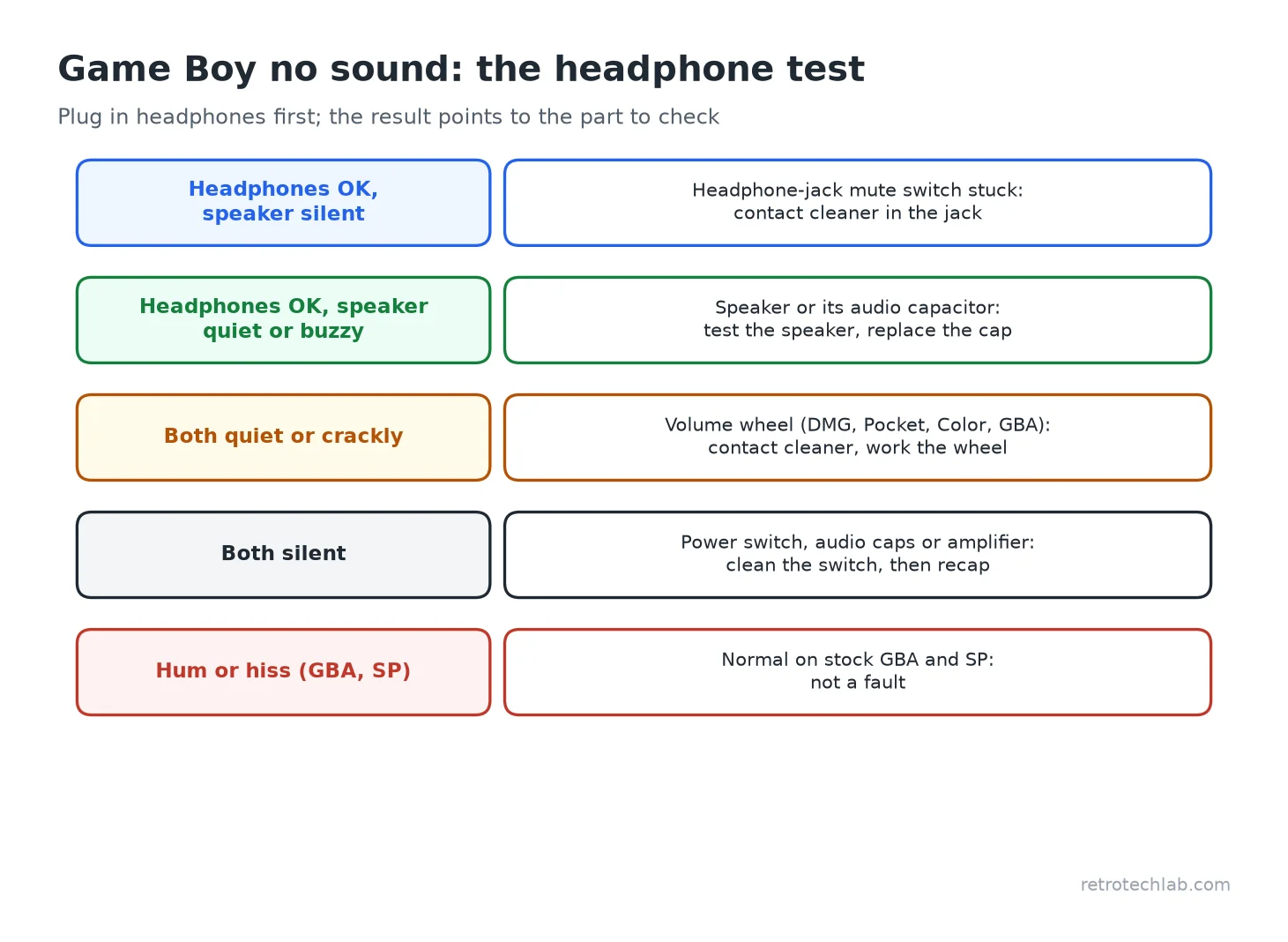
Plug in a pair of headphones you know work and turn the volume up. The answer points you to one of three places:
| Headphones | Speaker | Most likely cause | First fix |
|---|---|---|---|
| Work normally | Silent | Headphone-jack mute switch stuck | Contact cleaner in the jack |
| Work normally | Quiet, buzzy or rattling | Speaker or the speaker’s audio cap | Test the speaker; replace the cap |
| Quiet or crackly | Quiet or crackly | Volume wheel (DMG, Pocket, Color, GBA) | Contact cleaner, work the wheel |
| Silent | Silent | Power switch, audio caps or amplifier | Clean the power switch, then recap |
| Hum or hiss (GBA, SP) | Hum or hiss | Normal for these models | Not a fault on a stock console |
ConsoleArtisan credits the split between the second and third rows to a Reddit repairer: the volume wheel sits before both outputs, so “If headphones sound normal and only the speaker is quiet, the pot is not your problem.”
Why does the speaker stop when headphones work?
ConsoleArtisan calls this “the highest-yield audio diagnosis in the whole line.” The Game Boy Resource wiki explains the mechanism: “Every Game Boy headphone jack has a physical switch that is actuated by inserting headphones.” When corrosion or damage holds that switch open, “the Game Boy switches the internal speaker off” and never turns it back on.
On the original DMG, the open-source wiretap-retro jack board project shows how it works from Nintendo’s schematic. The switch is normally closed and connects a “detect” line to ground. While it is grounded, the speaker plays. When a plug opens it, the amplifier mutes the speaker. The jack board’s connector carries that line as pin 1 (SW) next to pin 2 (GND), and it runs back to pin 6 of the IR3R40 amplifier.
To fix it, cheapest first:
- Spray a little contact cleaner into the jack. Then insert and remove a headphone plug several times to wipe the contacts.
- Repeat, and leave it to dry before you power on.
- Still silent? Open the console and inspect the jack for green corrosion. Repairers on r/consolerepair report fixing badly corroded jacks by desoldering them and cleaning the contacts, but this is fiddly.
- Replace the jack. The part is Game Boy-specific and new old stock has largely gone, so the options are a donor console or a modern board. For the DMG, the wiretap-retro design is a drop-in jack board built around a CUI SJ-3566AN jack.
Which jack fits which console: ConsoleArtisan and the Game Boy Resource wiki agree that the DMG uses one type and the Advance, Color and Pocket share another.
Is the volume wheel the problem?
If the speaker and headphones are both quiet, crackly or cut in and out as you turn it, the volume wheel is dirty. On the DMG it is RV1, a 10 kΩ dual-gang thumbwheel marked B103. ConsoleArtisan calls a scratchy DMG wheel “the single most common misattribution in the DMG audio pile: people replace caps when it is a worn $3 pot.”
The wheel cannot be taken apart. The Game Boy Resource wiki’s method is to spray contact cleaner into it and turn it end to end many times. If it is corroded beyond that, a used one from a donor console is the realistic replacement.
Is the speaker dead?
Speakers do fail, especially if they rattle or distort at low volume. The Game Boy Resource wiki’s test is to desolder the speaker and measure across its two terminals: “You should get 8 ohms on a good speaker.” Open circuit means it is dead.
Replacements are two-wire solder-in parts, with no connector. ConsoleArtisan notes that the Color, Pocket and Light share one speaker, while the DMG, Advance and SP each take their own, so order for your model. The Game Boy Resource wiki adds a warning: a speaker that has gone bad is often a sign the audio capacitors need changing too.
Which capacitor fixes Game Boy sound on your model?
If the jack, wheel and speaker are fine, look at the electrolytic capacitors in the audio path. Replace them with the same capacitance and the same or higher voltage, and match polarity.
| Model | Audio capacitor(s) | Value | Notes |
|---|---|---|---|
| Original Game Boy (DMG-01) | C1, C2 on the headphone-jack board | 100 µF, 6.3 V | One per channel. RetroSix’s table calls the second one C7; the schematic and Console5 say C2 |
| Game Boy Pocket (MGB) | C31 | 100 µF, 6.3 V | ConsoleArtisan: “the classic low or no speaker output when it fails” |
| Game Boy Light | Check a Light list | Varies | ConsoleArtisan warns the Light’s caps do not match the Pocket’s despite the same numbers |
| Game Boy Color (CGB) | C38 | 100 µF | The audio cap. Replace C32 (power) and C35 (LCD) at the same time |
| Game Boy Advance | CP4 | See a GBA list | The amplifier’s ground reference; worth replacing on a humming GBA |
| Game Boy Advance SP | CP1 | 100 µF | The only electrolytic on the board. “If the fault survives CP1, it is not a capacitor fault” |
On the Color, an iFixit answer working from Nintendo’s service manual also names C14 and C27 in the speaker section: an open C38 means no speaker audio, a shorted C14 can shunt the audio away, and a faulty C27 affects the speaker amplifier.
If the capacitors are good, the amplifier is last. On the DMG it is a Sharp IR3R40, which ConsoleArtisan says has no modern drop-in, and the Pocket’s IR3R53N “is NOT a substitute”. RetroSix’s CleanAmp boards replace the audio path instead.
Why does my Game Boy Advance or SP hum?
Some hum and hiss is normal on these two. ConsoleArtisan says the GBA and SP amplifiers are clean on the bench and “the noise originates in the console”, with the SP the noisiest of the line, so “Do not chase this as a repairable defect on a stock console.” Cleaning the volume control and power switch is the free fix. Be careful with louder amplifier boards: RetroSix’s own warning, quoted by ConsoleArtisan, is that on a GBA “CleanAmp alone makes hum and hiss noticeably worse”, so it needs their Dehum board too.
Why does my SP have no sound through headphones?
The SP has no headphone jack. Its audio leaves through the EXT2 charge connector, so headphones need an adaptor. ConsoleArtisan notes that the left and right outputs pass through R18 and R19 (56 Ω each) on the way to EXT2, so one dead channel on headphones with a working speaker points at those resistors, the connector or the adaptor, not the amplifier. The SP’s volume slider (VR2, 30 kΩ) controls the amplifier rather than sitting in the signal path, so a dirty slider shows up as sudden volume jumps rather than crackle.
Tools that help
Game Boy shells are held by tri-point screws (usually sold as “tri-wing”). According to iFixit’s Game Boy screwdriver guide, the original Game Boy (DMG) and Game Boy Color need a Y1 tri-point driver, the Game Boy Advance needs Y1 plus a JIS #1 (or PH1), and the GBA SP needs Y0 plus a JIS/PH00. A set with both Y0 and Y1 covers every model; see our console screwdriver bit chart. A contact cleaner suitable for electronics handles the jack, the wheel and the power switch.
- Tri-wing (tri-point) screwdriver set with Y0 and Y1: check price on Amazon
- DeoxIT D5 contact cleaner spray: check price on Amazon
Affiliate links: if you buy through them we may earn a small commission at no extra cost to you. We link to tools only where they help with the repair; prices change, so check the price on Amazon.
Related guides
- Game Boy vertical lines fix
- Best Game Boy mods and screen replacements
- Restoring retro handhelds
- How to spot and replace failed capacitors
- Game Gear recap guide
Sources: ConsoleArtisan Game Boy family repair reference, compiling Console5, RetroSix, ConsoleMods and Gekkio’s traced schematics; Game Boy Resource: common issues; wiretap-retro DMG headphone jack PCB; iFixit Answers: Game Boy Color, no sound from the main speaker.
FAQ
Why does my Game Boy have sound through headphones but not the speaker?
The headphone jack has a switch that mutes the speaker when a plug is inserted. Corrosion can hold it in the “plugged in” position. Spray contact cleaner into the jack and insert and remove a plug repeatedly; if that fails, replace the jack.
How do I fix crackling sound on a Game Boy?
Clean the power switch first, then the headphone jack, then the volume wheel with contact cleaner, working each through its full travel. If it still crackles, replace the audio capacitor for your model, such as C38 on a Game Boy Color.
Which capacitor controls sound on a Game Boy Color?
C38 (100 µF) is the audio capacitor. Most repairers replace it together with C32 (power) and C35 (LCD), the Color’s other two electrolytics.
How do I test a Game Boy speaker?
Desolder it and measure across its two terminals with a multimeter. A good speaker reads about 8 ohms; an open circuit means it has failed.
Is it normal for a Game Boy Advance SP to hum?
Some hum and hiss is normal on the GBA and SP and is not a repairable fault on a stock console. Clean the volume control and power switch, and avoid fitting a louder amp on its own, which makes the noise worse.