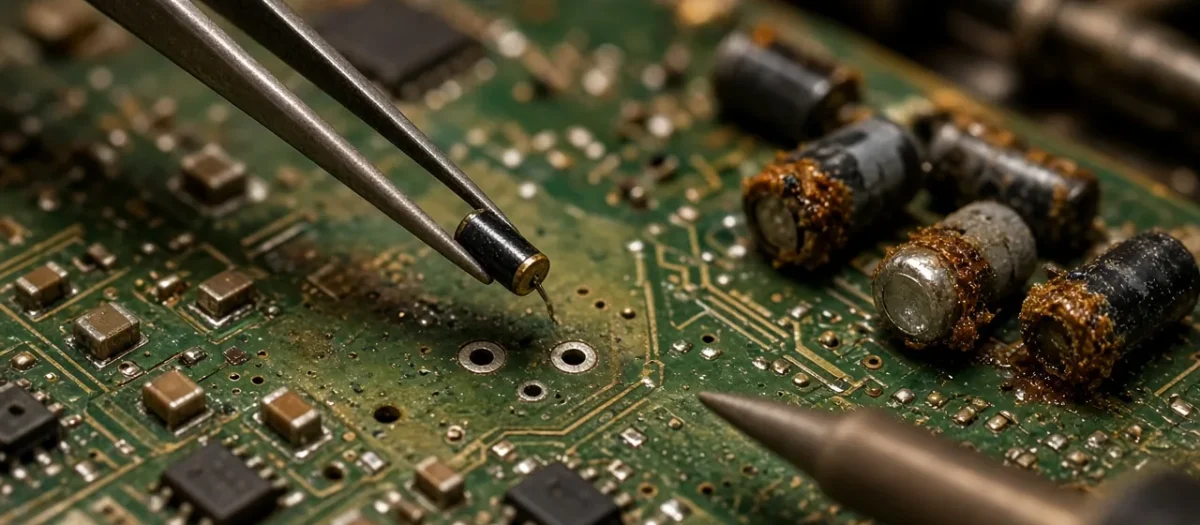
Quick answer: A Game Gear recap means replacing the small surface-mount electrolytic capacitors on its three boards: the main board, the sound board and the power board. Leaking capacitors cause most of its faint-screen, no-sound and won’t-power-on faults. Identify your main board first, because the lists differ: a VA1 (the most common) has 20 capacitors, 12 on the main board, 5 on the sound board and 3 on the power board. Remove the old ones by twisting them off, not heating and pulling, clean away all the leaked electrolyte, and check the polarity of every new part. A recap will not fix a dim backlight.
Most recap guides stop at the parts list. This one also covers how to tell your board apart without guessing, where the published lists disagree, and the specific faults that appear after a recap (a white screen, a black screen, or a silent speaker) and how to trace them. It draws on the Console5 Game Gear wiki, SMS Power’s capacitor tables and ConsoleArtisan’s Game Gear repair reference.
Is it safe to work on a Game Gear?
Treat it with more care than a Game Boy. ConsoleArtisan warns that the Game Gear “runs a +34 V rail to bias the LCD” and has a backlight inverter “in the kilovolt range”. Both are live even on AA batteries, because the power board boosts the battery voltage, so pulling the wall adapter does not make it safe. Power it off and take the batteries out before you touch the boards, and keep one hand off the board if you have to probe it running.
Which Game Gear board do you have?
The board revision is printed on the main board. Console5’s wiki and ConsoleArtisan give the main identifiers:
| Board | How to recognise it | Main-board part numbers |
|---|---|---|
| VA0 | Two custom chips plus a separate Z80 CPU; flat plastic screen lens | 837-7398-01, 837-7719-01, 837-7996 |
| VA1 | One large square chip marked 315-5535 (all regions) | 837-8560, 837-9024 |
| VA4 | Chip marked 315-5682, North America only, model 2110K | 837-9537 or 837-9537-01 |
| VA5 and Majesco | Chip marked 315-5682, model 2110G | 837-10766 (VA5), 171-7923A (2001 Majesco reissue) |
ConsoleArtisan’s quick test is to read the number on the big chip, then use the case label to split the later boards: 2110K is a VA4, and 2110G is a VA5, which includes the Majesco reissue. The VA1 was the last board for Europe and Japan. The VA4 and VA5 boards use a different layout and capacitor list from the VA1, so do not order a VA1 kit for them.
Has my Game Gear already been recapped?
ConsoleArtisan explains that on VA0 and VA1 main boards the factory capacitors sit inside rectangular plastic packages glued to the board, black or white, and it has never seen that package for sale. So a rectangular cap on those boards is original and a round one is a replacement. You can sometimes check without opening the shell: ConsoleArtisan passes on JapanJunker’s tip to look through the hole in the battery compartment on the left, where a square cap with + and – markings is original. That only works on VA0 and VA1 units. Later boards differ: the VA4 power board and the Majesco power and sound boards came with round caps from the factory, and the VA4 main board mixes in round ones.
Game Gear VA1 capacitor list
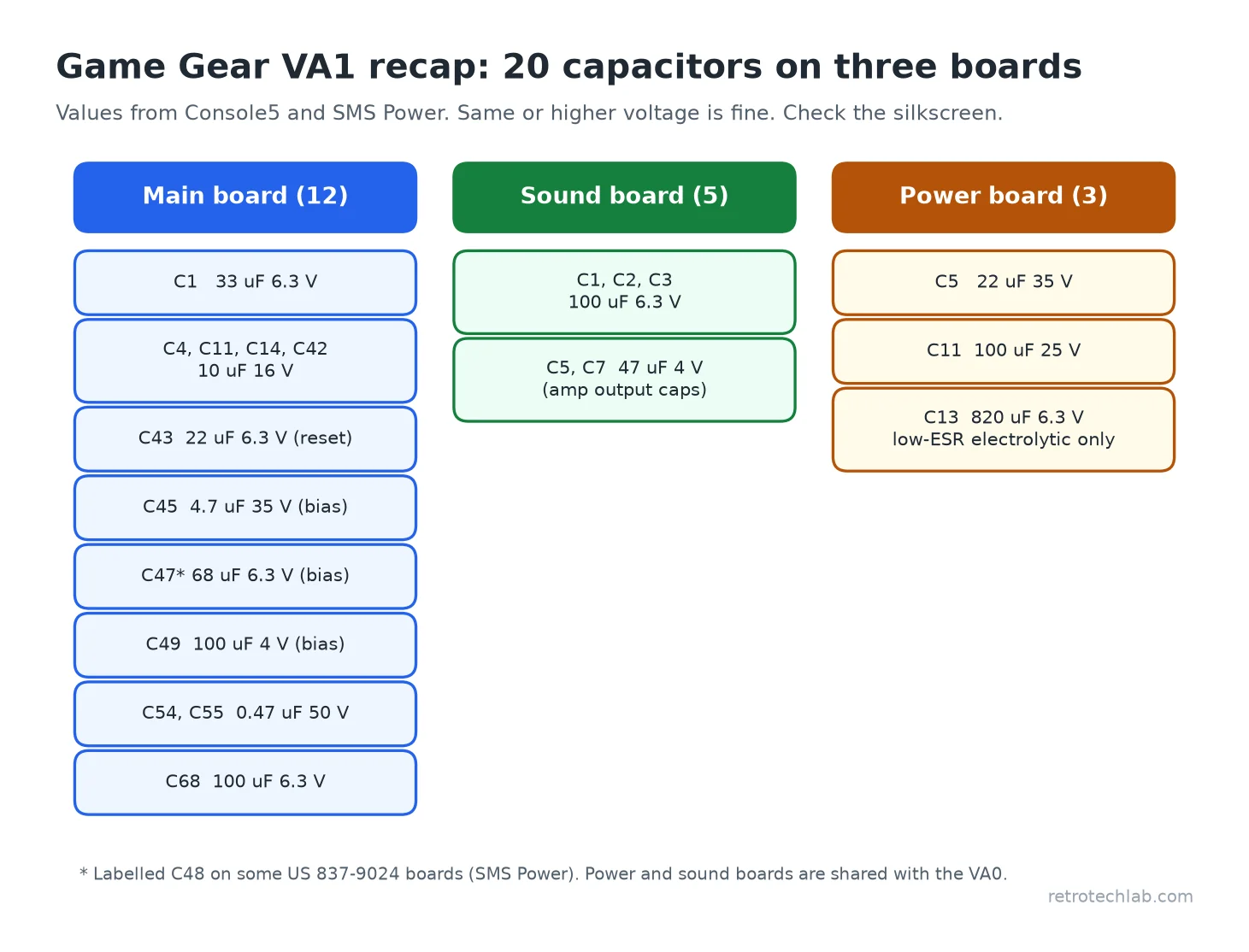
This is the list for the VA1 single-ASIC board from Console5’s wiki, cross-checked against SMS Power and ConsoleArtisan. Voltages are the original ratings: the same or higher is fine.
| Board | Position | Value |
|---|---|---|
| Main | C1 | 33 µF, 6.3 V |
| Main | C4, C11, C14, C42 | 10 µF, 16 V (or 6.3 V) |
| Main | C43 | 22 µF, 6.3 V |
| Main | C45 | 4.7 µF, 35 V |
| Main | C47 | 68 µF, 6.3 V |
| Main | C49 | 100 µF, 4 V |
| Main | C54, C55 | 0.47 µF, 50 V |
| Main | C68 | 100 µF, 6.3 V |
| Sound | C1, C2, C3 | 100 µF, 6.3 V |
| Sound | C5, C7 | 47 µF, 4 V |
| Power | C5 | 22 µF, 35 V |
| Power | C11 | 100 µF, 25 V |
| Power | C13 | 820 µF, 6.3 V |
Two notes the short lists leave out:
- C47 or C48? Console5 and ConsoleArtisan list the 68 µF part as C47 on a VA1, and SMS Power does too for the Japanese 837-8560 board. SMS Power’s table for the US 837-9024 board labels it C48. Go by the silkscreen on your board and the 68 µF value.
- The sound and power boards are shared. Console5 says they are “the same throughout most of the Game Gear line”, so the sound and power rows above also apply to a VA0. The VA0 main board has its own list of 11 (C1, C3, C6, C31, C35, C37, C39, C44, C45, C48 and C49), giving 19 in total.
Which parts should you use?
Like for like is fine, with the same capacitance and the same or higher voltage. ConsoleArtisan’s own approach on the main and sound boards is ceramics for the small values and a KEMET T520B107M010ATE070 (a 100 µF, 10 V polymer tantalum) in every 100 µF position, because neither type leaks. The power board’s three caps are through-hole, so they all get new through-hole electrolytics, and two of them need care:
- C13, 820 µF: a high-current spot. ConsoleArtisan says it “wants a proper low-ESR electrolytic. Never put a ceramic or any tantalum in the 820 uF position.” It is also the first suspect for a brown-out or a console that will not stay on.
- C5, 22 µF 35 V: keep the 35 V rating, or go higher.
How do you remove Game Gear capacitors without lifting the pads?
This is the step that turns a recap into a trace repair. ConsoleArtisan’s advice is not to desolder the cans in place, cut them off or “warm the joints and pull the can upward”, because all three peel the pad. Instead, using Mr Carlson’s method as shown by Adrian’s Digital Basement:
- Take the board out of the shell so nothing can melt.
- Grip the can with needle-nose pliers, push down, and twist and wiggle it until the legs snap. The downward pressure keeps the joint in compression.
- Remove the leftover legs with the iron, fresh solder and flux, then wick the pads clean.
- Clean every trace of old electrolyte with isopropyl alcohol and a brush. ConsoleArtisan notes it “eats copper” and conducts if left between pads.
- Inspect every pad and trace under magnification and repair any corrosion before fitting new parts.
Why is my Game Gear worse after a recap?
ConsoleArtisan’s checklist for a console that ran worse after a recap:
- Polarity. The stripe on an aluminium electrolytic marks negative, but the band on a tantalum marks positive. Reversed caps are a common find in photos of failed recaps.
- Both legs soldered. A cap held by one leg looks fine from above.
- Residue. Old electrolyte and flux between pads conducts.
- The gold pads. The bare gold circles are where the button standoffs press, and they are grounds. A part on one, or one too tall, stops the case closing.
- Tiny parts lost. Small parts near the caps get knocked off. ConsoleArtisan mentions a reader losing C15 and its own loss of L2 from a power board.
- Every pad ohmed to its net. A lifted pad can leave a new cap connected to nothing.
White, green or faint screen after a recap
If you can hear the game, the CPU and cartridge are fine and the fault is in the display bias. On a VA1 the bias-ladder caps are C45 (4.7 µF 35 V), C47 (68 µF) and C49 (100 µF). ConsoleArtisan says the ladder is value-sensitive: “A wrong value or a reversed cap in the ladder is enough on its own.” On both units it traced with this symptom, the cause was a via or ground in the ladder cut by the leak or the cleaning.
Black screen with the backlight on
ConsoleArtisan calls this the VA1 “floating-ground” fault: a cracked ground via, often on one of the gold button pads near the contrast wheel, leaves the LCD bias output sitting at about +5 V. “The screen goes uniform black with dead contrast while power, audio, and backlight are all fine.” Ohm the grounds around the bias section.
No sound after a recap
If headphones work but the speaker does not, check the speaker, its two-pin connector and the headphone jack’s cut-off switch. If the speaker plays only faintly, ConsoleArtisan says a “high-resistance path on the sound board” is more likely than the speaker, and it “commonly turns up days after a recap that seemed to work”. Check the joints on C5 and C7 (the amplifier’s output caps) and ohm both sides of every ground via. The amplifier is a TDA2822M or KA2209, an 8-pin part; beware 16-pin chips sold under the same name.
What a recap will not fix
ConsoleArtisan is clear that a recap “does not explain a dim backlight or a plain black screen” on an otherwise healthy console. A dim, pinkish backlight is usually the CCFL tube itself wearing out. A fully dark one points to the inverter. Recapping first still clears the noise, but budget for a backlight or screen fix if that is your symptom.
Tools that help
You need a temperature-controlled soldering iron, flux, desoldering braid and tweezers. Two inexpensive extras make the job safer:
- AstroAI digital multimeter: check price on Amazon. For ohming every pad to its net.
- 99% isopropyl alcohol: check price on Amazon. For cleaning away leaked electrolyte.
Affiliate links: if you buy through them we may earn a small commission at no extra cost to you. We link to tools only where they help with the repair; prices change, so check the price on Amazon.
Related guides
- How much is a Sega Game Gear worth?
- Restoring retro handhelds
- How to remove surface-mount capacitors
- How to spot and replace failed capacitors
- Game Boy no sound fix
Sources: Console5 TechWiki: Game Gear (board identification and capacitor lists from Sega’s service manuals); SMS Power: Game Gear capacitor values; ConsoleArtisan Game Gear repair reference; iFixit Game Gear capacitor replacement guide.
FAQ
How many capacitors are in a Game Gear?
A VA1 Game Gear has 20: 12 on the main board, 5 on the sound board and 3 on the power board. A VA0 has 19, because its main board has 11. VA4 and VA5 boards use different lists.
Do I need to recap all three Game Gear boards?
The main board always, because its surface-mount caps leak. The sound board is usually done too. ConsoleArtisan counts the power board as above and beyond on a working unit, but recaps it on most and always if the power board is dead.
Why is my Game Gear screen white after a recap?
If you can hear the game, check the LCD bias ladder: C45, C47 and C49 on a VA1. A wrong value, a reversed part, or a via cut by the leak or cleaning stops an image forming.
Why does my Game Gear have no sound after a recap?
Check the speaker, its connector and the headphone jack switch first. Faint speaker sound with normal headphones usually means a high-resistance joint or ground via on the sound board, around the amp output caps C5 and C7.
Will a recap fix a dim Game Gear screen?
Usually not. A dim backlight is normally the CCFL tube wearing out, and a fully dark one is the inverter. A recap fixes faint or missing images and sound, not the backlight.