Quick answer: If your N64’s red power light comes on but the TV stays black, the most common cause is the Jumper Pak or Expansion Pak in the top slot: it terminates the console’s memory bus, so if it is dirty, loose or missing the N64 will not boot at all. Pull it out, clean its contacts and the cartridge’s with high-purity isopropyl alcohol, and push it back in firmly. If that does not fix it, check in this order: a region mismatch between console and cartridge, the TV input and A/V cable, the 12 V rail that powers the video encoder, and the A/V Multi Out socket. A cracked chip under the CPU is the last suspect, not the first.
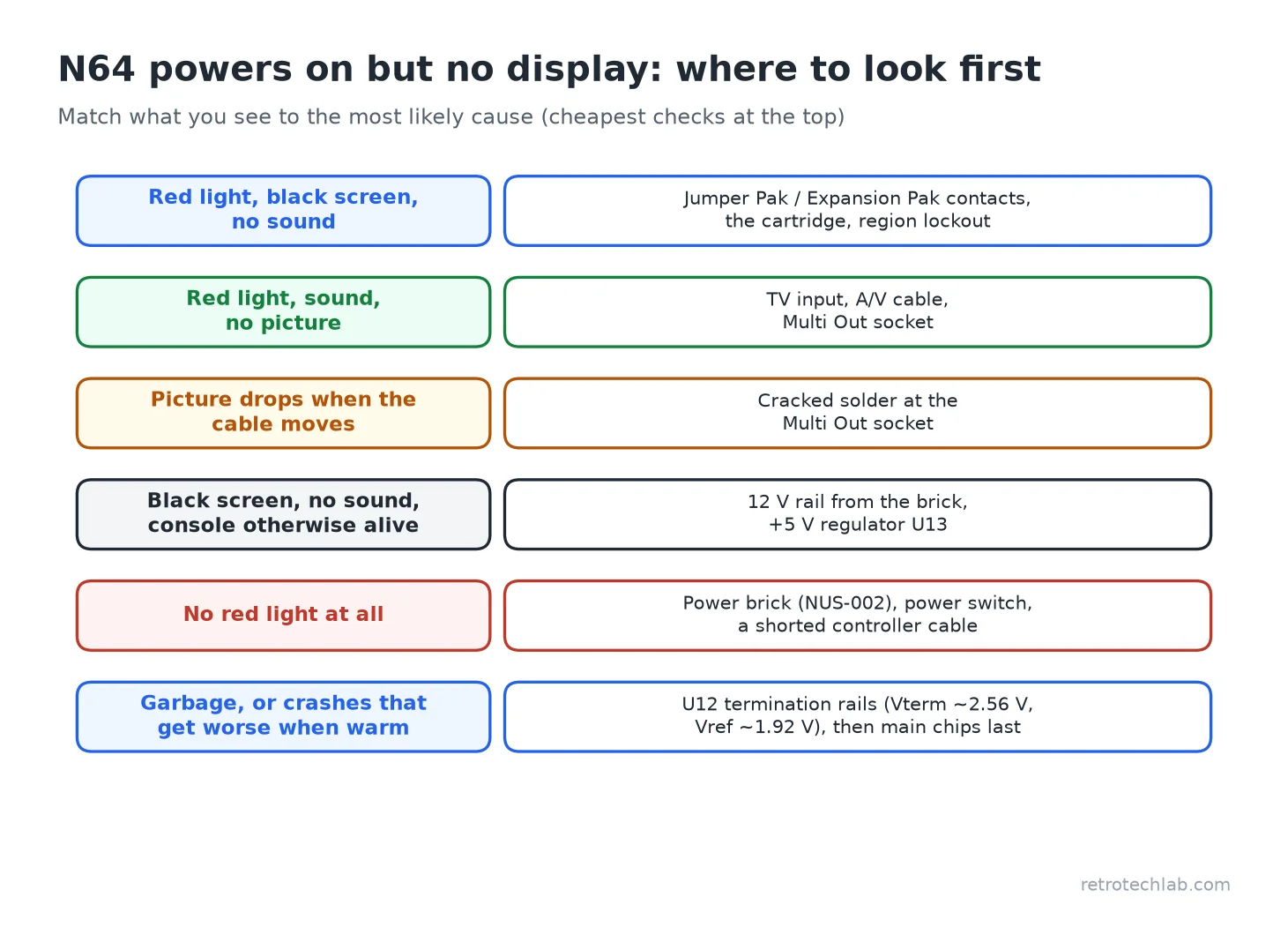
This guide sorts the fault by what you can see (red light or no light, sound or no sound) and gives the test-point voltages from the N64’s service documentation, so you can stop at the first check that finds the problem. It draws on Nintendo’s N64 instruction manual, ConsoleArtisan’s N64 repair reference and the RetroTechCollection N64 maintenance guide.
Is the red light on, and is there any sound?
Start with what the console is telling you. These two observations split the fault into three different areas before you pick up a screwdriver.
| What you see | Where to look first |
|---|---|
| Red light on, black screen, no sound | Jumper/Expansion Pak, cartridge, region lockout |
| Red light on, black screen, no sound, console otherwise “alive” | The 12 V rail and the +5 V regulator U13 |
| Red light on, sound but no picture | TV input, A/V cable, Multi Out socket |
| Picture flickers or vanishes when you move the cable | Cracked solder at the Multi Out socket |
| No red light at all | Power brick (NUS-002), power switch, a shorted controller cable |
| Garbage on screen, or crashes that get worse as it warms up | U12 termination rails, then the main chips (last) |
Why does a dirty Jumper Pak cause a black screen?
The N64’s main memory is Rambus RDRAM, and the bus it sits on has to be terminated. That is the Jumper Pak’s only job. ConsoleArtisan puts it plainly: “The Jumper Pak contains no memory whatsoever: it is purely a bus terminator.” An empty slot does not give you a console with less RAM; it gives you one that “will not boot at all”, with a red power LED, a black screen and no sound. A 4 MB Expansion Pak terminates the bus in the same way.
ConsoleArtisan says “More than half of ‘dead N64’ reports resolve right here”, and Nintendo’s own troubleshooting table includes the same check: “Make sure the Jumper Pak is inserted correctly into the Memory Expansion slot on the top of the Control Deck.”
- Switch off. Lift the flap in front of the cartridge slot and pull the Pak straight up.
- Clean its gold contacts with isopropyl alcohol on a lint-free swab, and let it dry.
- Reinsert it until it clicks down level. A half-seated Pak looks exactly like a dead console.
- If you have one, try a second Jumper Pak or an Expansion Pak to rule out a failed one.
Never blow on the Pak or a cartridge: ConsoleArtisan notes that breath moisture oxidises the contacts. For a fuller explanation of the two Paks, see our guide to the N64 Expansion Pak vs Jumper Pak.
Could it be the cartridge or a region mismatch?
Clean the cartridge’s edge connector the same way and try at least two games you know work. The cartridge slot has 50 pins on a multiplexed bus, so one bent or dirty pin can stop a game from booting or show garbage instead.
If the game is from another region, the black screen is not a fault. On boot, the cartridge’s CIC lockout chip sends its region to the console’s PIF chip, and if they do not match, the PIF halts the CPU. ConsoleArtisan describes the result as “Black screen, red LED, nothing else.” It also points out that the console’s region is held in the PIF, not the cartridge, and that the lockout keeps running after boot, so pulling a cartridge mid-game halts the CPU again.
Try a cartridge from the same region as the console before you suspect anything else. If a previously modded console suddenly does this, check the mod’s wiring first.
Is the TV set to the right input?
Nintendo’s manual lists the boring causes first, and they are worth a minute: the power switch on, the supply plugged in, and “If using an A V connection to your TV, make sure the TV/VIDEO switch is switched to video.” With an RF switch, the TV also has to be tuned to the right channel.
Things that catch people out on modern sets:
- No composite input. Some current TVs have no composite input, or only a shared one that needs an adaptor. If there is no picture through a converter, test the console on another TV or a capture device before you open it. Our guide to connecting an N64 to a modern TV covers the options.
- S-video on a PAL console. ConsoleArtisan notes that late PAL boards (NUS-CPU(P)-03) do not output S-video at all, and earlier PAL boards need a cable with particular parts to display it correctly. A PAL N64 on an S-video cable can look dead when composite works fine.
- A suspect cable. Swap in a known-good A/V cable. iFixit’s troubleshooting guide also suggests checking your TV supports the cable type you are using.
Why are there no picture and no sound together?
If the Pak, cartridge and TV all check out and the console is otherwise alive, look at the 12 V side of the power. The N64’s video encoder runs from +5 V, and that +5 V is made on the board from the 12 V rail by a regulator, U13 (78M05). The audio amplifier runs from +12 V directly. ConsoleArtisan’s point is that “one dead rail takes both out while the 3.3 V digital side keeps running”, so no picture plus no sound is a power clue, not an audio one.
The power brick (NUS-002) supplies only two rails: +3.3 V at 2.7 A and +12 V at 0.8 A, on a six-pin connector. RetroTechCollection notes that no +5 V comes from the supply. With a multimeter:
| Test point | Healthy reading | If it is wrong |
|---|---|---|
| Brick 3.3 V rail, under load | 3.3 to 3.6 V | Brick fault, or a short pulling it down |
| Brick 12 V rail, under load | 10.8 to 12 V | Brick fault: no video encoder, no audio |
| U13 “V0” test point | +5 V | Replace U13 with any modern 78M05 or L78M05 |
| Vterm test point (U12) | about 2.56 V | U12 failure: garbage video or no boot |
| Vref test point (U12) | about 1.92 V | U12 failure |
The voltage figures are from ConsoleArtisan’s reference, which is based on Nintendo’s service manual; RetroTechCollection lists the same U13, Vterm and Vref checks in its routine inspection. Pin numbers differ between the plug and the socket, so find the rails with the meter rather than trusting a printed pinout. U12, a Sharp PQ7VZ5, is obsolete with no documented drop-in, so a donor board is the realistic fix if it has failed.
What if the red light does not come on at all?
Swap in a known-good power brick first. ConsoleArtisan says a dead N64 is “far more often a dead NUS-002 than a dead mainboard.” Two quick checks before you condemn the brick:
- Unplug every controller. A shorted controller cable can pull the 3.3 V bus to ground and trip the brick’s protection, which looks exactly like a dead supply.
- Work the power switch. The slide switch passes both rails and oxidises. Spray contact cleaner into it and slide it on and off 30 to 50 times. If the console drops out when you knock it, this is the usual cause.
Do not open the brick unless you know what you are doing. Its mains-side capacitor holds a dangerous charge after unplugging: typically C2, 100 µF at 200 V in NTSC bricks and 47 µF at 400 V in PAL bricks (C103 on the Panasonic Type M design). North American and European bricks are not interchangeable.
Could the A/V socket be cracked?
If the picture comes and goes when you wiggle the cable, the solder joints on the Multi Out socket on the board have probably cracked. Reflowing them fixes it. The Multi Out carries composite video on pin 9, S-video luma and chroma on pins 7 and 8, +5 V on pin 10 and audio on pins 11 and 12. The N64 uses the same 12-pin connector as the SNES and GameCube, so a SNES cable is a handy known-good test.
When is it the board itself?
Only after everything above. The CPU and the RCP graphics chip are mounted on solder balls (BGA), and decades of heat cycles can crack them. ConsoleArtisan’s signs are random crashes, polygon or audio glitches or a no-boot that all get “worse as the console warms”. It calls this “the last suspect, not the first”, and warns that a reflow is often temporary: a reball by someone with rework equipment is the lasting fix. Check the three thermal pads on the heat spreader are present too: the N64 uses 1 mm pads, not paste.
Tools that help
You need a 4.5 mm gamebit to open the console shell (cartridges use 3.8 mm), and a basic multimeter for the rail checks above.
- Gamebit screwdriver set, 3.8 mm and 4.5 mm: check price on Amazon
- AstroAI digital multimeter: check price on Amazon. See also our guide to the best multimeters for retro electronics.
Affiliate links: if you buy through them we may earn a small commission at no extra cost to you. We link to tools only where they help with the repair; prices change, so check the price on Amazon.
Related guides
- N64 Expansion Pak vs Jumper Pak: what each does
- Fixing common N64 problems
- How to connect an N64 to a modern TV
- Composite vs S-video vs RGB explained
- N64 loose joystick fix
- Best N64 games of all time: 25 ranked, with prices
Sources: Nintendo 64 instruction booklet (PAL, Australian edition, archive.org), troubleshooting table; ConsoleArtisan N64 repair reference, which compiles Nintendo’s NUS-06-0014-001A service manual and ConsoleMods; RetroTechCollection N64 maintenance guide; iFixit N64 troubleshooting.
FAQ
Why does my N64 turn on but show nothing?
The most common cause is a dirty, loose or missing Jumper Pak or Expansion Pak. The console needs one in the top slot to terminate its memory bus and will not boot without it. Clean and reseat it, then check the cartridge, region and TV input.
Can an N64 work without the Jumper Pak?
No. With an empty Memory Expansion slot the N64 shows a red light and a black screen. The Jumper Pak holds no memory; it only terminates the RDRAM bus, so a 4 MB Expansion Pak or a Jumper Pak must be fitted.
Why does my N64 show a black screen with an imported game?
The region lockout. The cartridge’s CIC chip reports its region to the console’s PIF chip, and if they do not match, the PIF halts the CPU: red light, black screen, nothing else. Use a cartridge from the same region or a region converter.
Why is there no picture and no sound on my N64?
If the Pak, cartridge and TV are fine, suspect the 12 V rail. The video encoder runs from +5 V made from 12 V by regulator U13, and the audio amp runs from 12 V, so losing that rail removes both. Measure 10.8 to 12 V from the brick and +5 V at U13.
What voltage should an N64 power supply give?
The NUS-002 supplies +3.3 V at 2.7 A and +12 V at 0.8 A. Under load the 3.3 V rail should read 3.3 to 3.6 V and the 12 V rail 10.8 to 12 V. There is no 5 V rail from the brick.