Quick answer: a PS2 “disc read error” is a symptom, not a diagnosis. The same message appears whether the disc is dirty, the laser lens is dusty, the laser sled is stuck in dried grease, one of the laser’s two diodes is failing, or the disc simply isn’t a format the console accepts. Start with the four-disc test below to find out which. Then work cheapest first: clean the disc and the lens, clean and re-grease the sled rails, check the mechanism, and replace the laser only after that. Don’t turn the laser potentiometers. They don’t restore a worn laser; they overdrive it.
Sony settled a US class action over PS2 disc read errors in 2005, so this is a long-recognised fault family. The good news is that the cheap fixes cure a lot of consoles. This guide draws on Sony service-manual data as compiled in ConsoleArtisan’s PS2 repair reference and the PS2 Developer Wiki pickup page.
Step 0: the four-disc test
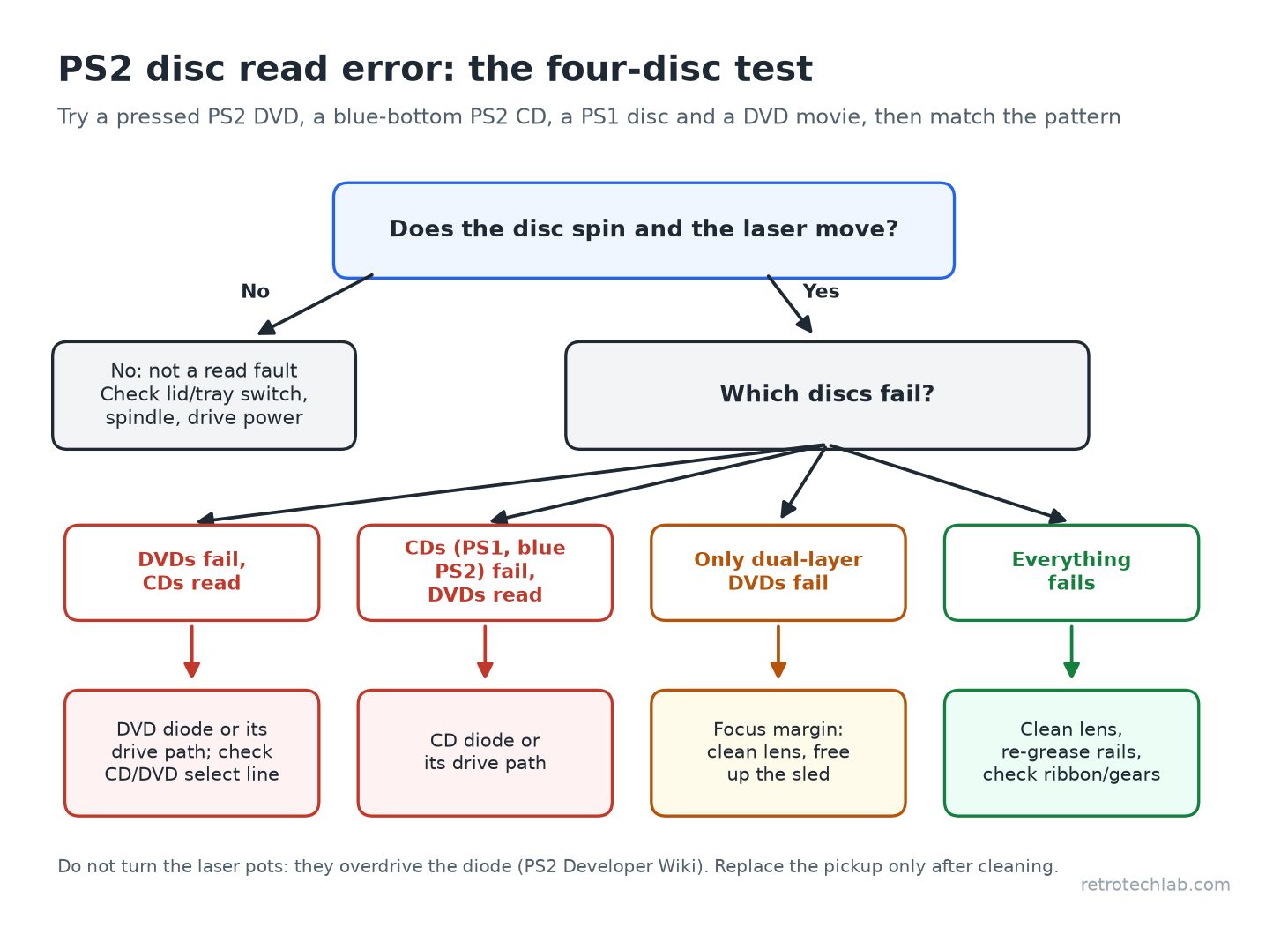
The PS2 laser (the “pickup”) has two laser diodes: one for CDs and one for DVDs. Which discs fail tells you a lot. Try these, in this order:
- A pressed (not burned) PS2 DVD game. Most PS2 games are DVDs, with a silver underside.
- A pressed PS2 CD game, with the blue underside used by some early titles.
- A PS1 game (a CD).
- A DVD movie.
Then read the pattern:
| What happens | Most likely cause |
|---|---|
| Nothing spins at all | Not a read fault. Check the lid or tray switch, the spindle and the drive’s power before anything else. |
| CDs read, DVDs fail | The DVD side of the laser (or its drive circuit). Since CDs read, the sled, spindle and alignment are probably fine. |
| DVDs read, CDs (blue PS2 discs and PS1 games) fail | The CD side of the laser. Often unnoticed until someone tries a PS1 game. |
| Single-layer DVDs read, dual-layer ones fail or freeze at a certain point | Focus and tracking margin rather than a dead diode. Dirt on the lens or a sticky sled is the usual culprit. |
| Everything fails, but the disc spins and the laser moves | Dirt, sled lubrication or mechanics. Work through steps 1 to 4. |
| Worked perfectly, then suddenly reads nothing, and the reset button does nothing until you pull the power | A possible “MechaCon crash” (see below). Look into this before fitting a new laser. |
ConsoleArtisan notes that a CD/DVD selection line runs to the laser. A fault on that line, such as a cracked ribbon, can produce the same “CD but not DVD” split without the diode itself being worn, which is another reason to check the ribbon before buying a pickup.
Rule out the things that aren’t hardware faults
Some messages look like read errors but aren’t:
- “Please insert a PlayStation or PlayStation 2 format disc” (the red screen) usually means a wrong-region or unsupported disc rather than a read failure.
- “DVD Player is not set up” on the first Japanese models (SCPH-10000 and 15000) is missing software. Those consoles load the DVD player from a memory card.
- Originals read but burned discs don’t: that’s usually media or burn quality, not a faulty console.
Step 1: clean the disc and the lens
Clean the disc first and try another known-good game, so a single bad disc doesn’t send you down the wrong path. Then unplug the console, open the lid or tray area as needed, and clean the lens with a cotton swab lightly dampened with isopropyl alcohol, using no pressure. The lens sits on delicate springs. Our guide to cleaning a CD player lens covers the technique, and it’s the same on a PS2.
On a Fat PS2, ConsoleArtisan also flags the internal power supply as a cheap co-suspect. Ageing capacitors can cause resets and, according to the PS2 Developer Wiki, read errors. Treat it as a possibility to rule out, especially if the console also resets, clicks or gets worse as it warms up. The supply runs from mains voltage, so only open it if you’re qualified.
Step 2: clean and re-grease the sled rails
The laser rides on metal rails and is moved by a small motor and gear rack. Over 20+ years, the factory grease dries or picks up dust. ConsoleArtisan reports that dried or contaminated grease is a far more common cause of a read that stalls partway across the disc than a dead laser diode.
- With the console unplugged and opened, push the laser gently along its rails by hand. It should move smoothly from one end to the other.
- If it’s stiff or gritty, clean the old grease off the rails with isopropyl alcohol and apply a small amount of plastic-safe synthetic grease.
- Check the worm gear and rack teeth for wear or broken teeth.
Step 3: check the mechanism and the ribbon
- Laser ribbon cable: it flexes every time the laser moves. Make sure it’s fully seated and its connector lock is closed. Look for creases or cracks.
- Spindle: the disc should grip and spin up cleanly without wobbling.
- Fat tray: a tray that opens slowly or not at all is usually a perished tray belt or a stripped gear. That’s a separate fault from reading.
- Slim ribbon scratching discs: on most Slims, the drive ribbon can flex up into the spinning disc and cut a circular scratch. ConsoleArtisan notes that only the SCPH-790xx has factory holders to prevent it. Check where it sits with the lid open before spinning a disc you care about.
Tilt or skew adjustment comes only after the mechanism is clean and moving freely. Mark any adjuster before you touch it, and move it in tiny steps.
Why you shouldn’t turn the laser potentiometers
Many older guides say to turn the small potentiometers on the PS2 laser to “boost” it. According to the PS2 Developer Wiki, the two pots (one for CD, one for DVD) don’t set laser power directly. The drive’s automatic power control already regulates laser output and compensates for ageing. The pots change the feedback level that control loop works from, so turning them overdrives the diode beyond its specification.
A console that only reads because a pot was turned has gained some tolerance for dirt or misalignment at the cost of the diode’s life, and the fault usually returns. If a used PS2 has had its pots turned, assume it will need a new laser.
Step 4: replacing the laser (pickup)
If cleaning, lubrication and mechanical checks haven’t fixed it, the laser is the next step. Ordering the right one matters more than on most consoles.
Fat PS2:
| Pickup | Used in | Notes |
|---|---|---|
| KHS-400B | Earlier fat chassis | Taller base. The PS2 Developer Wiki warns that a KHS-400C in a drive designed for the 400B can seem to work and then bend the ribbon at the outer edge of the disc. |
| KHS-400C | Later fat chassis (F to I) | Comes in two lens types (white ring T487 and yellow ring T609K) that need different calibration data in the console. |
| Sanyo SF-HD7 (sometimes sold as “KHS-400R”) | Same chassis as the KHS-400C | Fits the same way, but the console needs different calibration data before it reads properly. |
Because of these calibration differences, a new Fat laser can read worse than the old one until the console is configured for it. Community tools such as LensChanger or PMAP handle this. Also check whether the new pickup has a small solder bridge across the laser terminals for static protection. Sony’s instructions are to remove it after fitting.
Slim PS2 (SCPH-7000x to 9000x): the Slim drive came from two vendors. Most use a Mitsumi mechanism, whose pickup is sold under several names (KHM-430, PVR-802W, KHS-430, TDP-182W). Some K and L chassis consoles use a Sankyo mechanism, which takes only its own pickup (SPU3170). Identify which you have first. ConsoleArtisan notes that replacement Slim pickups often arrive with the wrong laser arm length, so be prepared to transfer the original arm.
The MechaCon crash: when a working PS2 suddenly reads nothing
ConsoleArtisan and ConsoleMods describe a specific failure on many later Fat and early Slim consoles. The drive controller crashes, typically on a hard-to-read disc, and keeps driving the laser’s focus and tracking coils until they burn out. The symptom is a console that read fine, then reads nothing at all, with a reset button that does nothing until you remove power. A new laser in such a console can be damaged the same way.
According to those sources, consoles from the SCPH-390xx onwards can be affected, and it’s much more common on the SCPH-500xx Fats and the early SCPH-700xx Slims. Sony fixed it from the SCPH-750xx onwards, and in SCPH-700xx boards with MechaCon version 6.04 or later. A protective “PIC fix” mod exists for affected boards. If you’re buying a PS2 to keep, this is worth knowing. Our guide to checking a retro console before buying covers testing a used console.
Fat or Slim: which is easier to fix?
Neither is hard to open, but the Fat has more serviceable parts (tray belt, gears, separate pickups), and its power supply is internal and mains-powered. The Slim’s drive is more integrated. Its pickup is tied to the drive vendor, and the SCPH-900xx moved back to an internal power supply. If you’re shopping rather than repairing, our PS2 price guide covers current values for each model.
Related guides
- PS1 stuck on the boot screen: how to fix it
- How to clean a CD player lens
- How much is a PlayStation 2 worth?
- Best multimeters for retro electronics
Sources: ConsoleArtisan PS2 repair reference, which compiles Sony service manuals, psdevwiki and ConsoleMods; PS2 Developer Wiki: Pickups.
FAQ
What causes a PS2 disc read error?
The most common causes are a dirty disc or laser lens, dried grease on the laser sled rails, a worn laser diode, or a mechanical problem with the sled, spindle or ribbon cable. Some non-hardware issues, such as wrong-region or burned discs, produce similar messages.
Why does my PS2 read CDs but not DVDs?
The PS2 laser has separate CD and DVD diodes. If CD-based games and PS1 discs work but DVDs fail, the DVD side of the laser or its drive circuit is the likely problem. A fault on the CD/DVD select line, such as a cracked ribbon, can also cause it, so check that before buying a new laser.
Should I adjust the PS2 laser potentiometer?
It’s best not to. According to the PS2 Developer Wiki, the pots don’t directly set laser power. Turning them overdrives the diode, which may make discs read for a while but shortens the laser’s life. Clean the lens and fix the sled lubrication first.
Is it worth replacing a PS2 laser?
Often, yes, if cleaning and re-greasing haven’t helped. But order the correct pickup for your exact model and chassis. On Fat consoles, some replacements need the console’s calibration data changing before they read properly.
Why did my PS2 suddenly stop reading every disc?
If it worked normally and then stopped reading everything, and the reset button doesn’t respond until you unplug it, it may have suffered the “MechaCon crash”. That fault can burn out the laser’s focus and tracking coils. It mainly affects later Fat models and early Slims, and a protective PIC fix mod exists.