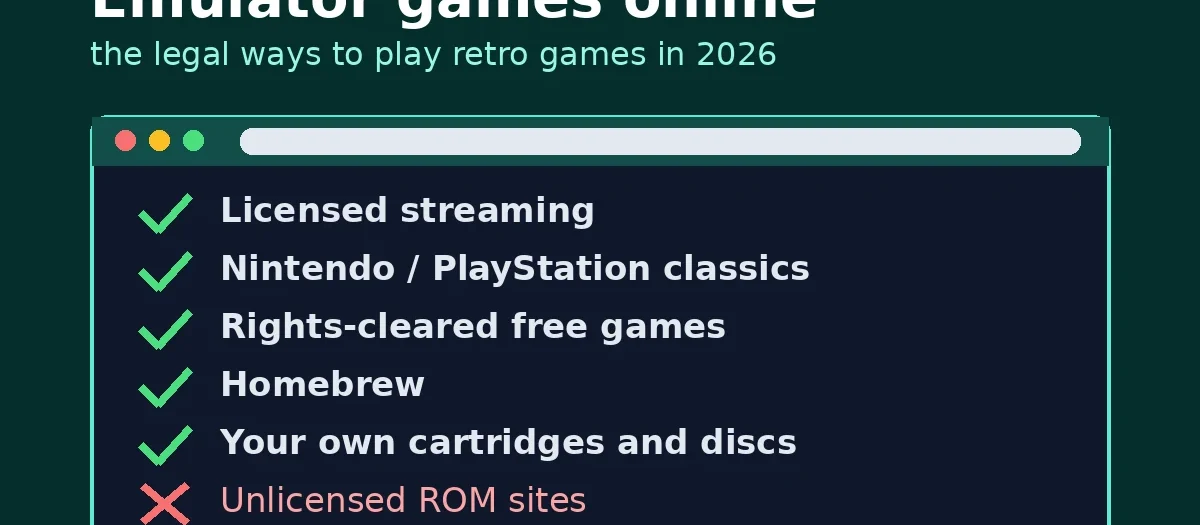
Quick answer: Most free “emulator games online” sites that let you pick from thousands of Nintendo, Sega or PlayStation games are hosting those games without the publishers’ permission. The legal ways to play retro games online are: a licensed streaming service such as Antstream Arcade (over 1,300 licensed games); Nintendo Switch Online (NES, SNES and Game Boy, plus N64, GBA, Mega Drive and, on Switch 2, GameCube with the Expansion Pack); PlayStation Plus Premium’s Classics Catalogue; free sites that only host games their rights holders allow, such as FredyGames; homebrew games; and browser emulators like the RetroArch Web Player, RetroBox or Afterplay.io used with game files you made from your own cartridges and discs.
We have rewritten this guide in October 2026. Earlier versions named free ROM sites; we no longer name or link them, and nothing on this page links to game or BIOS downloads.
Affiliate links: if you buy through the Amazon links on this page we may earn a small commission at no extra cost to you. The only Amazon link on this page is a controller.
What does “emulator games online” actually mean?
An emulator is a program that imitates an old console’s hardware so its games run on a PC, phone or browser. “Emulator games online” usually means an emulator running inside a web page (most are ports of open-source emulators compiled to JavaScript or WebAssembly), so there is nothing to install.
The emulator is rarely the legal problem. The game file is. A cartridge or disc image (a “ROM”) is a copy of a copyrighted game, and putting thousands of them on a website for anyone to play is distribution without permission. That is why the big free sites come and go: Nintendo has won court judgments worth millions of dollars against ROM sites, in 2018 and again in 2021.
So the useful question is not “which site has the most games” but “where does the game file come from?” There are four legal answers:
- A licensed service. The service has a deal with the publisher.
- A rights holder’s free release. Shareware, freeware, or a game whose owner has released it for free sharing.
- Homebrew. A new game made for an old system, shared by its own developer.
- Your own copy. A file you made from a cartridge or disc you own, played in an emulator. Rules on personal backups vary by country, so check where you live.
Which legal services let you play retro games online?
| Service | What you play | Cost | Where it runs | Why it is legal |
|---|---|---|---|---|
| Antstream Arcade | Over 1,300 arcade, console and home computer games | Free tier; paid plans (yearly or lifetime) unlock the full library | PC, Mac, Android, Xbox, PlayStation, some Samsung and LG TVs, and web (streamed) | Officially licensed; titles from Atari, Bandai Namco, Disney and others |
| Nintendo Switch Online | NES, SNES and Game Boy games | £17.99 a year in the UK | Switch and Switch 2 | Nintendo’s own service |
| Switch Online + Expansion Pack | Adds N64, Game Boy Advance, Virtual Boy and Mega Drive; GameCube on Switch 2 | £34.99 a year in the UK | Switch and Switch 2 (GameCube on Switch 2 only) | Nintendo’s own service |
| PlayStation Plus Premium | A Classics Catalogue of older PlayStation games | Monthly or yearly; check the current price | PS4 and PS5 | Sony’s own service |
| FredyGames | Homebrew for NES, Game Boy, GBA, Mega Drive, Atari 2600 and more; DOS games; TIC-80 and Arduboy; text adventures | Free | Any modern browser | Only games whose licence allows sharing; the licence is shown on each game’s page |
| RetroBox (gerla.cc) | Over 200 free, freely licensed games, or your own files | Free (beta) | Any modern browser | Its library is licensed for free sharing; your own files stay on your devices |
| Afterplay.io | Your own game files, plus games sold in its store | Bringing your own files is free; store games and Afterplay+ are paid | Browser and apps, with saves synced | You supply the files, or buy from publishers in its store |
| RetroArch Web Player | Your own files, in the official libretro web build | Free | Desktop browsers | Open-source emulator; you load your own content |
| Homebrew on itch.io | New games for old systems, many as web builds | Mostly free or pay-what-you-want | Any modern browser | Published by their own developers |
Antstream Arcade
Antstream Arcade is the closest legal match to what people expect from “emulator games online”: a big library you can start in seconds. It streams games from its servers rather than running them on your device, and it says it has “over 1,300 officially licensed retro games”, with titles from Atari, Bandai Namco, Disney and others. There is a free tier, and paid plans unlock the full library; check its pricing page for the current annual and lifetime prices. Because it streams, it needs a steady internet connection.
Nintendo Switch Online
If you own a Switch, this is the cheapest legal way to play a lot of Nintendo classics. The base membership (£17.99 a year in the UK) includes NES, Super NES and Game Boy libraries. The Expansion Pack (£34.99 a year) adds Nintendo 64, Game Boy Advance, Virtual Boy and SEGA Mega Drive games, and on Switch 2 a growing GameCube library. Some games support online play with friends. See our guide to getting retro games on Nintendo Switch for what else is sold on the eShop.
PlayStation Plus Premium
The top PlayStation Plus tier includes a Classics Catalogue of older PlayStation games on PS4 and PS5, alongside its main game catalogue. The list changes, so check that the games you want are in it before you pay for Premium rather than Extra.
Free, rights-cleared sites: FredyGames and RetroBox
FredyGames says every game it hosts “is here because its rights holders allow it to be shared”: it reads each licence, publishes it on the game’s page, and hosts source code where the licence requires it. Its library is homebrew for the NES, Game Boy, Game Boy Advance, Mega Drive, Atari 2600 and other systems, DOS games, fantasy consoles such as TIC-80, Arduboy games and text adventures. You will not find Mario or Sonic there, and that is the point.
RetroBox is a free browser emulator (in beta) by an independent developer. It opens with a library of over 200 freely licensed games (homebrew and games their authors give away, each with its own licence) for systems including the Atari 2600, NES, SNES, Game Boy Advance, Mega Drive, Commodore 64 and MS-DOS. You can also add your own files from your computer, a home NAS or your own server, and the developer says nothing is uploaded to its server.
Browser emulators for your own games
If you have dumped your own cartridges or discs, three browser options will play them without installing anything:
- RetroArch Web Player. The official browser build of RetroArch from the libretro team. Pick a core, choose Add Content, and load your file. It is more basic than desktop RetroArch.
- Afterplay.io. You “bring your own game files” and it stores them against your account so your library and saves follow you between devices. It also has a store of games made for classic consoles, which you buy separately.
- RetroBox. As above; it reads files from your own storage.
For setting up a full emulator on a PC or phone instead, our list of the best retro gaming emulators and the retro emulation guide go further.
Homebrew and publisher re-releases
People still make new games for the NES, Game Boy and Mega Drive. Many are free, and plenty run in the browser: GB Studio, a popular Game Boy game maker, can export a web build, and itch.io has a large section of browser games, including homebrew. Publishers also sell many classics again as single games or collections on PC and modern consoles. Buying those pays the people who made them.
What about the Internet Archive?
The Internet Archive runs in-browser emulation of old software and games. Some of that material is shareware or has been cleared, but much of it was uploaded by users without a publisher’s licence, and the Archive relies on its own preservation arguments and takedown process. Its legal position for commercial games is contested, so we do not recommend it as a legal source and do not link to its game collections.
How can you tell if a site is a ROM site?
Use these warning signs. One on its own proves nothing, but several together almost always means the games are unlicensed:
- Thousands of big-name games for free, especially current Nintendo series such as Mario, Zelda and Pokémon. Nintendo does not license its games to free websites.
- No company or licence information: no “about” page saying who runs the site, and no mention of publisher deals or licences.
- Download buttons for ROMs, “BIOS packs” or “full sets” next to the play button.
- Heavy pop-ups and redirect ads, fake “update your browser” or “virus found” warnings, or requests to install an extension. These are a security risk as well as a legal one.
- Frequent domain changes with the same design, which usually follows takedowns.
A legal service tells you who licensed the games (Antstream), shows you the licence (FredyGames, RetroBox), is run by the platform owner (Nintendo, Sony), or asks you for your own files.
Which option should you choose?
- You want the most games with the least effort: Antstream Arcade on whatever device you have.
- You own a Switch: Nintendo Switch Online, and the Expansion Pack if you want N64, GBA, Mega Drive or (on Switch 2) GameCube.
- You want something free and legal right now: FredyGames or RetroBox’s built-in library, or homebrew on itch.io.
- You own the cartridges and discs: dump them and use the RetroArch Web Player, Afterplay.io or RetroBox in a browser, or a desktop emulator. Our guide to legal ways to emulate retro games explains the dumping options and the legal line.
Browser emulators are fine with a keyboard for simple games, but most retro games feel better on a pad. Any modern USB or Bluetooth controller works in Chrome, Edge and Firefox through the browser’s gamepad support; a PC pad such as the 8BitDo Ultimate 2C Wireless is a sensible choice.
Sources: each service’s own website and documentation, read on 28 October 2026 (Antstream Arcade, Nintendo UK, PlayStation UK, FredyGames, gerla.cc RetroBox, Afterplay documentation, libretro documentation, GB Studio documentation). We have not tested these services ourselves; prices are UK list prices on that date where shown.
FAQ
Are emulator games online legal?
The emulator is legal; the game file usually is not. Free sites offering thousands of commercial games normally have no licence for them. Licensed services (Antstream Arcade, Nintendo Switch Online, PlayStation Plus), rights-cleared free sites, homebrew and your own backups are the legal options.
Where can I play retro games online for free and legally?
FredyGames and RetroBox host free games whose licences allow sharing, and itch.io has many free homebrew games that run in a browser. The Nintendo and PlayStation subscriptions and Antstream Arcade are paid.
Can I play Nintendo games online legally?
Yes, through Nintendo Switch Online on a Switch or Switch 2. The base membership has NES, SNES and Game Boy games, and the Expansion Pack adds N64, Game Boy Advance, Virtual Boy, Mega Drive and, on Switch 2, GameCube games. Free websites with Nintendo games are not licensed.
Is Antstream Arcade free?
It has a free tier, but the full library of over 1,300 licensed games needs a paid plan. Antstream offers annual and lifetime options; check its pricing page for current prices.
Can I play my own ROMs in a browser?
Yes. The RetroArch Web Player, Afterplay.io and RetroBox all let you load game files you made from your own cartridges or discs. Rules on making personal backups vary by country.
Are free ROM sites safe?
Often not. Many rely on aggressive pop-up and redirect ads, fake virus warnings or extension prompts, which are a security risk on top of the copyright problem. Licensed services do not need them.