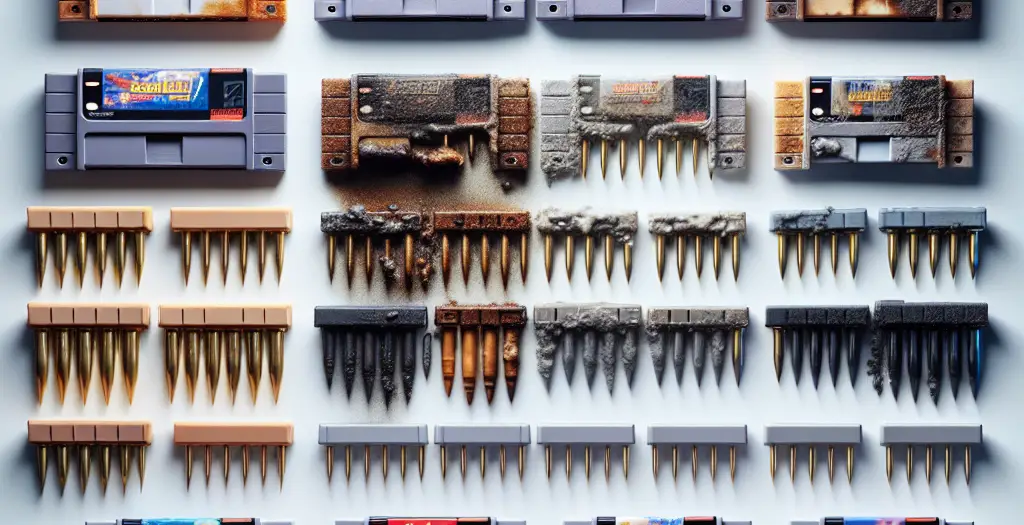
You’ve pulled out a cartridge you haven’t played in fifteen years. The game boots—barely. Graphics flicker. Audio cuts in and out. You blow on the pins like you did as a kid, and it works for thirty seconds before the problem returns. You’re not imagining it. Those gold-plated contact pins are corroded, and the intermittent electrical connection is real physics, not a childhood myth.
This is the most common failure point in retro gaming hardware. Not failed chips. Not degraded capacitors. Not worn-out joysticks. It’s the interface between the cartridge and the console—a pair of metal contacts that have spent decades in cardboard boxes, attics, and basements, slowly oxidizing.
The frustrating part: corrosion isn’t always visible to the naked eye. You can have cartridges that look pristine on the outside but have contact resistance measured in thousands of ohms where they should measure milliohms. Meanwhile, a cartridge that looks visibly discolored might clean up perfectly. Understanding what’s actually happening at the material level—why it happens, how to diagnose it reliably, and what cleaning methods actually work without damaging the gold plating—requires stepping past the standard “isopropyl alcohol and cotton swabs” advice you’ll find everywhere.
What you’ll learn and why it matters
By the end of this article, you’ll understand the electrochemistry of cartridge corrosion, how to measure contact resistance with basic equipment, and which cleaning methods will actually restore playability without destroying the delicate plating. You’ll also learn which corrosion patterns indicate hardware problems versus cartridge problems—a distinction that matters when troubleshooting a console with multiple failing cartridges.
This matters because intermittent game failures create a debugging nightmare. You can spend hours swapping cartridges, trying different consoles, and blaming your hardware when the real problem is sitting in your hand. And unlike some retro gaming problems that require soldering or parts replacement, corrosion is often completely reversible if you approach it methodically.
The electrochemistry of cartridge corrosion: what’s actually happening
Nintendo, Sega, and Atari all made the same design choice for their cartridge connectors: they used nickel-plated or gold-plated steel or copper pins. The reasoning was sound: precious metals resist oxidation far better than bare steel or aluminum. A 1-2 micron gold layer should theoretically protect a cartridge for decades.
In practice, three things went wrong.
First, the gold plating was thin—sometimes much thinner than the spec, depending on the manufacturing facility and the era. Second, every manufacturing process leaves microscopic pinholes in the plating. These holes expose the base metal beneath. Third, and most importantly, the environment inside a cartridge is not inert. It’s dynamic and corrosive.
Oxygen, moisture, and the electrochemical cell
Corrosion is an electrochemical process. It requires three things: two dissimilar metals, an electrolyte (a medium that conducts ions), and oxygen or another oxidizing agent. Your cartridge provides all three.
Start with the pins themselves. They’re typically copper or steel with gold plating. Copper and gold are dissimilar metals—they have different electrical potentials. The plastic housing around the pins often contains residual manufacturing chemicals or moisture absorbed from the air. That’s your electrolyte. And the tiny gaps in the plating, plus any exposed base metal, create a galvanic cell.
At the pinhole, oxygen from the air (especially in damp environments) oxidizes the base metal. Copper oxidizes to copper oxide and copper hydroxide, which are dark green or blue-black. Steel oxidizes to iron oxide, which is red-brown. Gold itself doesn’t oxidize—but the base metal beneath it does, and when it swells as it corrodes, it can crack and lift the gold plating.
This happens slowly at room temperature. Very slowly. But it compounds. Once copper oxide forms, it’s not conductive. Electrical current has to jump across it—increasing contact resistance. The higher the resistance, the more heat the contact generates. Heat accelerates the corrosion reaction. A cartridge stored in a hot attic or garage corrodes vastly faster than one stored at stable room temperature.
Why humidity matters more than you think
The critical variable is humidity. At humidity below 30%, corrosion proceeds at a negligible rate. At 40-60% (typical for many homes), it’s steady. Above 70%, it accelerates dramatically. And cartridges stored in basements, attics, or unheated garages—where humidity can reach 80-90% in summer—corrode aggressively.
This is why some of your cartridges are fine and others are wrecked, even though they’ve all been stored in the same house. A cartridge tucked into a bedroom shelf (stable 40% humidity) will look almost new. A cartridge in a basement (60-80% humidity) will show visible oxidation.
The visible signs: what the corrosion looks like
On NES cartridges, you’ll see a dull, slightly discolored patina on the pins—anything from pale gold to dark brown or even black. This is a mix of surface oxides and tarnish. On SNES cartridges, which use a different alloy, the corrosion often appears as a light gray or greenish film. Sega Genesis cartridges are particularly prone to visible corrosion because the pins are more exposed to the environment.
But here’s the critical point: visible discoloration is not always proportional to electrical resistance. A cartridge with a dark brown patina might clean to 0.1 ohms of contact resistance—perfectly playable. Another cartridge with just a light gray film might measure 50-100 ohms—causing constant glitching or no-boots. The depth of the oxide layer and its chemical composition vary wildly depending on humidity cycles, temperature swings, and the exact plating thickness.
How corrosion affects gameplay: from intermittent glitches to complete failure
Contact resistance follows a logarithmic relationship with audio and video corruption. At 0.5 ohms or less, everything works perfectly. Between 0.5 and 5 ohms, you’ll see occasional glitches—lines appearing in graphics, audio cutting out, the game freezing for a frame. Between 5 and 20 ohms, the game boots unreliably. Above 20 ohms, the console often won’t recognize the cartridge at all.
The reason is voltage drop. The NES and SNES power the cartridge through these pins at 5 volts. The game ROM and supporting chips draw current—anywhere from 500 milliamps to over an amp, depending on what’s happening on screen. By Ohm’s Law, voltage drop equals current times resistance. At 5 ohms and 500 milliamps, you’ve lost 2.5 millivolts—trivial. But when that ROM is switching, current spikes to several amps in microseconds. At 20 ohms and 2 amps, you’re dropping 40 millivolts. The ROM now sees 4.96 volts instead of 5.0. The ROM’s threshold for detecting a valid logic “1” might be 3.5 volts, but it’s sensitive to noise and timing. A 40 millivolt drop, combined with the noise from thousands of pins switching simultaneously, can cause bit errors.
These show up as: random pixels on screen, sprites that don’t render, audio that distorts or mutes, the game freezing mid-frame, or the cartridge not being recognized at all when you insert it.
The “blowing on it” phenomenon isn’t a myth—it temporarily works because moisture condensation increases resistance, and blowing dries it slightly, reducing the oxide layer’s conductivity momentarily. You’re not cleaning it; you’re evaporating moisture that’s making the corrosion worse. The effect lasts until the pins cool and moisture reabsorbs.
Distinguishing cartridge corrosion from console connector wear
Before you invest time cleaning cartridges, you need to know if the problem is the cartridge pins or the console’s connector slots. These require different solutions.
Console connector wear manifests as problems affecting every cartridge you test, regardless of the cartridge’s condition. The spring contacts inside the console lose tension or the gold plating on the console’s female pins wears away. This is actually less common than cartridge pin corrosion because the console sits in one place and gets far less mechanical stress.
Cartridge pin corrosion affects specific cartridges. You can test this directly: if cartridge A glitches constantly but cartridge B plays perfectly on the same console, the problem is cartridge A’s pins, not the console.
To test a suspect console, borrow a cartridge you know is in excellent condition. If the borrowed cartridge plays flawlessly, your console is fine. If it glitches, the console has worn or corroded contacts. If the borrowed cartridge works but several of your cartridges don’t, you’re looking at multiple corroded cartridges.
Diagnostic testing: how to measure contact resistance without specialty equipment
The gold standard for diagnosing cartridge corrosion is measuring contact resistance with a multimeter. You don’t need anything fancy—a $20 digital multimeter works perfectly.
The basic resistance test
What you need: A digital multimeter set to the ohms scale (usually marked with the Ω symbol). Most meters have multiple ohms ranges—start with the lowest one (often 200 ohms or 20 ohms full scale).
Procedure:
- Power off the console completely. Unplug it from the wall.
- Insert the cartridge you want to test.
- Set your multimeter to measure resistance (ohms). Use the lowest ohms range.
- Place one probe on pin 1 of the cartridge connector (the leftmost pin when the cartridge is facing you). Place the other probe on the console’s ground (a metal screw in the console’s case, or the metal shielding on the back).
- Record the reading. Repeat for pins 2, 3, 4, and the rightmost pins.
What you’re measuring: the resistance path from each pin through the cartridge’s internal circuitry to ground. A clean, uncorroded contact reads 0.1–0.5 ohms. Corrosion adds resistance progressively. At 1–2 ohms, you might see occasional glitches. At 5+ ohms, the cartridge becomes unreliable or unbootable.
The key insight is that the resistance you measure includes the cartridge’s internal resistance plus the contact resistance at the pins. If you measure 50 ohms but the cartridge’s internal circuit should only add 0.1 ohms, the extra 49.9 ohms is contact resistance from corrosion.
A practical baseline: the visual inspection shortcut
Before you reach for the multimeter, spend 30 seconds with a bright light and magnification. Look at each pin closely. Are they shiny gold? Are they dull? Are there visible dark spots or patches? Are they dark brown or black?
Shiny gold or light gray = likely clean or very light corrosion. Likely to work fine or need only minor cleaning.
Dull but uniform = light oxidation. Probably playable but might benefit from cleaning.
Visible dark spots or streaks = moderate corrosion. Likely to have glitches.
Dark brown or black = heavy corrosion. Probably won’t boot reliably.
This isn’t a replacement for measuring, but it saves you from testing cartridges that are clearly fine and helps prioritize which ones to clean first.
Cleaning methods: what actually works and what damages gold plating
Now that you’ve diagnosed the problem, here’s how to fix it. Not all cleaning methods are equal. Some remove corrosion safely. Others remove the gold plating along with it.
Method 1: Isopropyl alcohol and soft brushing (safest for regular maintenance)
This is your first line of defense. Isopropyl alcohol is a solvent that removes surface oxidation and tarnish without chemically attacking the gold. It’s safe because it doesn’t corrode the base metals or strip plating.
What you need: 90% or higher isopropyl alcohol, a soft brass brush (not steel—steel can scratch and embed particles), and a lint-free cloth or paper towel.
Procedure:
- Dampen the brass brush with isopropyl alcohol.
- Gently brush each pin from the base toward the tip, using light pressure. You’re not scrubbing hard—you’re loosening the oxide layer.
- After 10–15 strokes per pin, wipe with a dry lint-free cloth.
- Let the cartridge dry for 2–3 minutes before testing.
Why this works: isopropyl alcohol dissolves the organic contaminants (dust, fingerprints, packaging residue) that trap moisture against the pins. The soft brush mechanically dislodges loose oxide particles. Together, they reduce contact resistance without damaging the plating.
Effectiveness: For light to moderate corrosion (visual discoloration but no pitting), this removes 70–90% of the added resistance. For heavy corrosion, it helps but often doesn’t fully restore playability.
Safety note: Isopropyl alcohol is flammable and a respiratory irritant. Work in a ventilated space. Keep it away from heat sources.
Method 2: Vinegar-based chemical treatment (medium corrosion)
White vinegar (5% acetic acid) is mildly acidic and dissolves metal oxides more aggressively than alcohol. It’s often recommended for heavily corroded cartridges, but it requires care—prolonged contact can attack the base metal underneath the gold plating.
What you need: White distilled vinegar, a soft brass brush, and distilled water for rinsing.
Procedure:
- Soak a brass brush in white vinegar.
- Brush the pins gently, using the same motion as the alcohol method.
- Work for 30–60 seconds per cartridge—not longer. The acidity is attacking the corrosion, not just loosening it.
- Immediately rinse the cartridge thoroughly with distilled water to stop the chemical reaction.
- Dry completely with a lint-free cloth.
- Optionally, do a final quick brush with isopropyl alcohol to ensure all water is displaced.
Why this works: Acetic acid dissolves the metal oxides faster than mechanical brushing alone. It breaks the chemical bonds holding the corrosion layer to the gold.
Effectiveness: For moderate to heavy corrosion, this recovers 85–95% of contact quality. For extremely heavy corrosion with visible pitting, it gets you 50–70%.
Risk: Extended contact (more than a minute or two) can etch the underlying base metal and weaken the plating bond. This is a medium-risk, medium-reward method.
Method 3: Eraser rubber technique (mechanical abrasion for resistant corrosion)
A clean pink eraser (the kind used for pencil marks) is mildly abrasive and can mechanically remove stubborn corrosion. This is a higher-risk method but effective for heavily oxidized cartridges that don’t respond to chemical treatments.
What you need: A new, clean pencil eraser (not a used one with pencil grit embedded), and isopropyl alcohol.
Procedure:
- Lightly dampen the eraser with isopropyl alcohol.
- Gently rub each pin, using light pressure and short strokes. You’re aiming for burnishing, not aggressive scrubbing.
- After 10–15 strokes per pin, wipe clean with a lint-free cloth.
- Inspect under magnification. The pin should look noticeably brighter.
- Test contact resistance with a multimeter.
Why this works: The eraser is just abrasive enough to remove the oxide layer without scratching the underlying gold significantly. The alcohol reduces friction and prevents the eraser particles from getting stuck in pinholes.
Effectiveness: For cartridges that don’t respond to chemical treatments, this often recovers 70–85% of contact quality.
Risk: You can remove some of the gold plating if you press too hard or rub too long. Only use this method if gentler approaches haven’t worked. And critically, inspect the pins after each session—if they start to look dull gray instead of gold, you’re removing plating and should stop.
Method 4: Baking soda paste (gentle polishing abrasive)
A paste made from baking soda and isopropyl alcohol creates a gentle polishing abrasive. It’s less aggressive than an eraser and safer for delicate gold plating.
What you need: Baking soda, isopropyl alcohol, and a soft brush.
Procedure:
- Mix baking soda and isopropyl alcohol into a paste (roughly 2:1 baking soda to alcohol).
- Dab the paste onto a soft brush.
- Gently brush each pin using light pressure.
- After 10–15 strokes, wipe thoroughly with a damp cloth (use distilled water).
- Dry completely with a lint-free cloth.
Why this works: Baking soda is a very mild abrasive (lower on the Mohs hardness scale than gold). It polishes away oxidation without cutting into the gold. It’s also slightly alkaline, which helps neutralize acidic corrosion products.
Effectiveness: For light to moderate corrosion, this recovers 60–80% of contact quality. For heavy corrosion, it’s less effective than vinegar but safer.
Method 5: What NOT to do
Avoid sandpaper, steel wool, or metal polishes designed for jewelry. These remove gold plating aggressively. Once the gold is gone, the base metal underneath oxidizes rapidly, and you’ve made the problem worse.
Also avoid aggressive solvents like acetone or mineral spirits. They can dissolve the plastic housing and damage the circuit board’s solder joints.
And forget the “magic erasers” (melamine foam). They’re too abrasive and will strip plating.
A practical cleaning protocol for multiple corroded cartridges
If you’re dealing with a collection and multiple cartridges show corrosion, here’s the workflow I recommend:
First pass: visual inspection and sorting. Look at all your cartridges under bright light and magnification. Separate them into three groups: clean (shiny or light gray), lightly corroded (dull, light discoloration), and heavily corroded (dark brown or black).
Second pass: alcohol and brush on the lightly corroded group. Spend 5–10 minutes on this group with isopropyl alcohol and a soft brass brush. This is where you’ll get the best return on effort.
Third pass: multimeter testing. After cleaning, measure contact resistance on a few pins from each cartridge. Record which ones are below 1 ohm (healthy), 1–5 ohms (marginal), and above 5 ohms (problematic).
Fourth pass: chemical or abrasive treatment on the marginal group. The cartridges that measure 1–5 ohms deserve more aggressive treatment. Try vinegar and brush, or a gentle eraser technique. Retest after each method.
Fifth pass: accepting losses. If a cartridge measures above 10 ohms of contact resistance and doesn’t improve significantly with aggressive cleaning, it likely has physical damage—pitting, plating separation, or corrosion that’s eaten into the base metal itself. These are candidates for professional refurbishment or, practically speaking, accepting that they won’t work reliably.
Storage and prevention: keeping your cartridges from corroding in the future
Once you’ve cleaned your cartridges, the goal is to prevent future corrosion. This is much cheaper than cleaning.
Humidity control is the single most important factor. Store cartridges in an environment below 50% relative humidity. A dry closet, a room with air conditioning, or a sealed container with silica gel desiccant all work. Avoid basements, attics, garages, and unheated spaces. If you live in a humid climate, consider a small dehumidifier in your game storage area.
Temperature stability matters. Avoid temperature swings. A cool, stable environment (60–70°F, 30–50% humidity) is ideal. Freezing temperatures don’t cause corrosion, but warming back up causes condensation, which accelerates it. Never store cartridges where they’ll experience dramatic temperature changes.
Sealed storage helps. Cartridges in sealed plastic cases corrode slower than loose cartridges because they trap a localized humidity environment that stabilizes once the case is sealed. The original plastic cases are actually better than nothing—keep them when you can.
Protective coatings are controversial but work. Some collectors apply clear acrylic or polyurethane coating to the pins as a preventative measure. This creates a physical barrier against oxygen and moisture. It works, but it’s not reversible—if you ever need to clean the pins again, you have to remove the coating first. Most experts recommend against it unless you’re storing cartridges long-term (decades) in very humid climates.
When to consider professional refurbishment or replacement
Not every corroded cartridge is salvageable. If you’ve tried alcohol, vinegar, and gentle abrasion without success, or if a cartridge measures above 20 ohms of contact resistance after cleaning, you’re looking at deep corrosion that may have compromised the gold plating’s integrity or eaten into the base metal itself.
At this point, you have a few options:
Professional recapping or refurbishment. Services exist (search “game cartridge reconditioning”) that will disassemble the cartridge, polish the pins more aggressively, or even replace them with new contacts. This typically costs $30–80 per cartridge, depending on the service and the game. It’s worth it for valuable or rare games you want to play.
Accepting emulation or flashcarts. If the cartridge is common or the restoration cost exceeds its value, emulation setups or flash cartridges offer a practical alternative. A flash cart can hold dozens of games and plays perfectly on original hardware. It’s not the same as playing the original cartridge, but it’s a legitimate solution.
Buying a replacement cartridge. If you find the game available used for less than professional refurbishment would cost, and your original is damaged beyond economic repair, replacement might make sense. The retro game market is liquid—common games are readily available in various conditions.
The economic breakpoint is roughly: if professional restoration costs more than 25–30% of the cartridge’s current market value, and you’re not emotionally attached to owning the original, replacement or emulation is the smarter choice.
Testing after cleaning: how to confirm you’ve solved the problem
Once you’ve cleaned a cartridge, you need to verify that it actually works. This means more than just “it boots sometimes.”
Test 1: Cold boot. Power on the console with the cartridge already inserted. The game should appear on screen within 2–3 seconds with no flickering or distortion. If it flickers or takes longer, contact resistance is still too high.
Test 2: Hot insertion. Start playing a game from another cartridge. While the game is running, carefully remove that cartridge and insert the cleaned one. The console should recognize it immediately and either load the new game or show an error screen (depending on the console’s behavior). If the console freezes, contact resistance is affecting power delivery.
Test 3: Sustained play. Play for at least 10 minutes continuously. Pay attention to any audio dropouts, visual glitches, or freezing. Occasional glitches that appear and disappear indicate marginal contact resistance—still some room for improvement, but often acceptable for casual play.
Test 4: Multimeter recheck. After cleaning and testing, measure contact resistance again with your multimeter. Healthy is below 1 ohm. Marginal but playable is 1–3 ohms. Above 3 ohms and you should consider additional cleaning or professional service.
The goal isn’t perfection—it’s reliability. A cartridge that boots consistently, plays for hours without glitching, and measures under 2 ohms is genuinely fixed. One that works 90% of the time but occasionally freezes is still problematic and deserves more aggressive treatment.
Cartridge-specific considerations: NES, SNES, Genesis, and beyond
NES cartridges use a 72-pin edge connector with relatively thick gold plating. They’re actually more resistant to corrosion than you’d expect. Most NES games from the 1980s can be cleaned successfully because the gold was applied more generously. The challenge is that the pins are tightly spaced and hard to reach with cleaning tools.
SNES cartridges use a similar 64-pin connector but with slightly thinner plating. Gold corrosion on SNES carts often appears as a light gray tarnish rather than dark brown. This superficial-looking corrosion can be deceptively problematic—it may measure 5–10 ohms despite looking relatively clean. Chemical treatment (vinegar or baking soda) works better than mechanical abrasion on SNES cartridges.
Sega Genesis cartridges use a different connector design with exposed pins. The pins are more vulnerable to environmental exposure and oxidize faster. However, the pin design is also easier to clean—you can access them more easily with a brush. Genesis cartridges respond very well to isopropyl alcohol and soft brush cleaning.
Atari 2600 cartridges have a different connector entirely—a 24-pin edge connector that’s less prone to corrosion because it was designed differently. But when corrosion does occur, the pins are smaller and more fragile. Clean gently.
The honest assessment: is your time better spent on cleaning or replacement?
Here’s the practical reality: cleaning a cartridge takes 10–15 minutes per game once you have your supplies and technique dialed in. If you own 20 cartridges, spending an evening cleaning them is reasonable. If you own 100 cartridges and half are corroded, you’re looking at 8–10 hours of work.
At that scale, the question becomes: what’s your time worth, and what are the games actually worth to you?
A collection of rare, valuable games (Japanese imports, variants, or games in the $100+ range) absolutely deserves professional restoration or careful DIY cleaning. You’re protecting an asset.
A collection of common games (most US NES and SNES releases, for instance) might be more economically served by selective replacement. A used copy of Super Mario Bros. costs $25–40. If you have three corroded copies and professional cleaning each costs $60, you’re better off with one restored copy and accepting that you don’t need multiple variants.
For collectors who genuinely care about owning original hardware and playing original cartridges, the cleaning investment makes sense. For casual players, understanding the full landscape of cartridge preservation and having realistic expectations about when to clean versus when to replace is more valuable than perfect pins.
A final thought on why this matters
Cartridge pin corrosion is a materials science problem, not a mystery. Understanding the actual electrochemistry—why it happens, what accelerates it, what reverses it—takes most of the frustration out of retro gaming troubleshooting. You’re not fighting against magic or planned obsolescence. You’re dealing with predictable oxidation chemistry that responds to moisture control, mechanical cleaning, and gentle chemical treatment.
Spend the time understanding the problem, test methodically with a multimeter, and you’ll solve 90% of “cartridge won’t work” issues without ever opening a console or soldering a wire. That’s the actual value of this kind of knowledge: not the techniques themselves, but the ability to diagnose accurately and make informed decisions about whether a game is worth saving or whether it’s time to move on.