Quick answer: if your SNES shows a perfect picture but makes no sound, rule out the cable and TV first. Try another AV cable, another TV input, or the RF output if you have one. If it’s still silent, the fault is on the console’s audio path. ConsoleArtisan’s SNES reference notes that a dead audio power rail (Vs) gives silence with a perfect picture, so measure that rail before replacing any chips. After that, Nintendo’s own fault order for distorted or missing sound points to the sound section and its connector, the CPU, then the audio amplifier/mixer at U10, then the Q18 transistor that feeds the audio power rail. Replacing capacitors rarely fixes total silence. It’s the fix for muffled or weak sound.
This guide follows Nintendo’s service-manual fault table as compiled by RetroTechCollection and ConsoleArtisan’s SNES repair reference. It covers the North American SNES, PAL SNES and Super Famicom.
First: is it really the console?
These checks take five minutes and need no tools:
- Try another AV cable. The SNES multi-out cable carries both picture and sound. A cable with a broken audio wire can still give a perfect picture.
- Check the TV input. Make sure the red and white (or SCART) audio is going to the input you’re watching, and that the TV isn’t muted or set to an external speaker.
- Try the RF output if you have an RF switch. If RF gives sound but the multi-out cable doesn’t, suspect the cable or the multi-out connector, not the audio circuit.
- Try another game to rule out a one-off problem with a cartridge.
- Check the power supply. The North American SNES and Super Famicom take 10 V DC, centre-negative, at least 850 mA. The PAL SNES takes AC from its own adapter. The sound amplifier runs straight from this raw supply, so a weak or wrong adapter is worth ruling out.
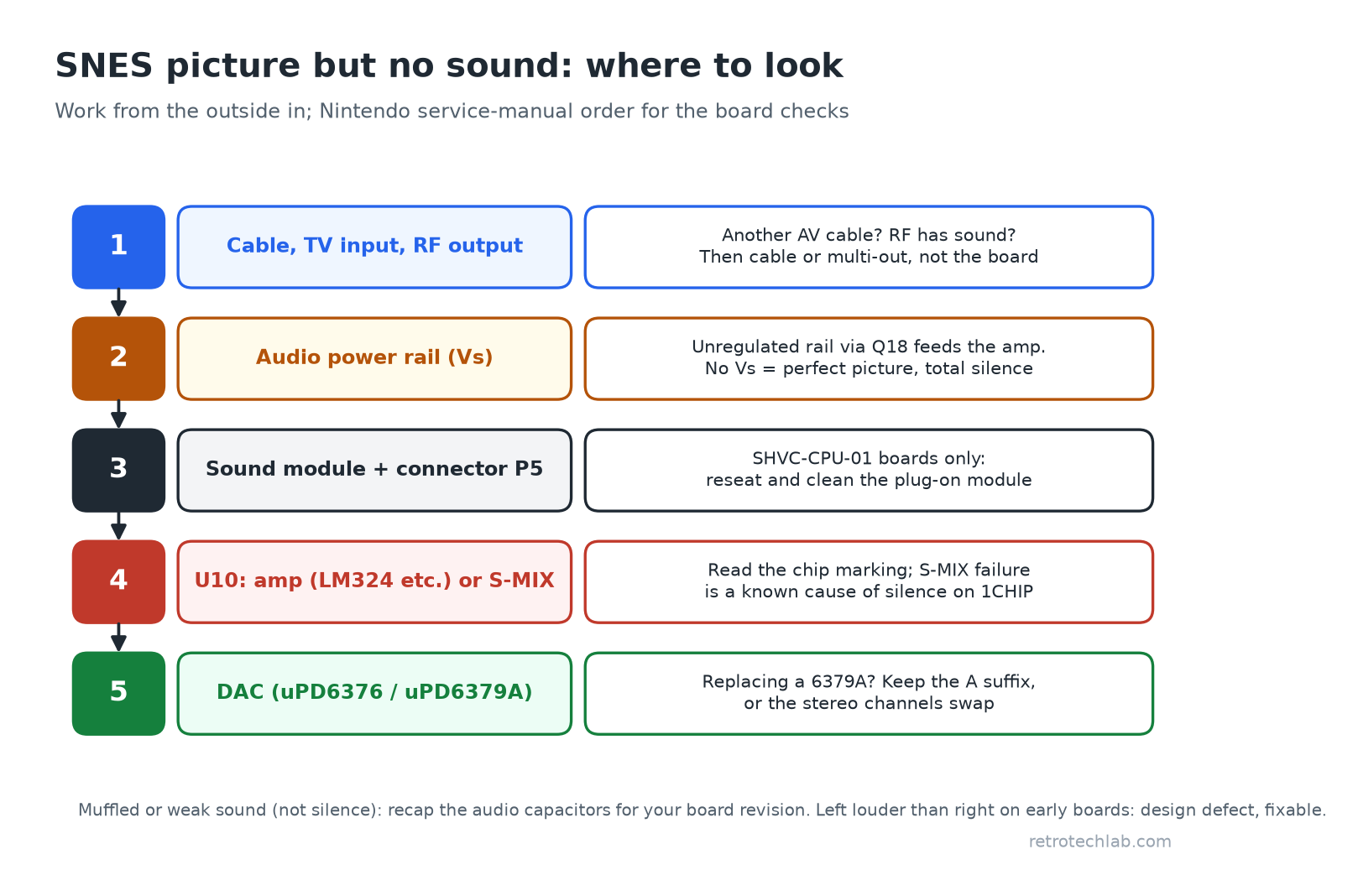
Picture but no sound: work in this order
| Step | Check | Why |
|---|---|---|
| 1 | Audio power rail (Vs) | The amplifier runs from the raw, unregulated supply via a transistor (Q18), not the 5 V logic supply. If that rail is missing, the console runs normally but silently. |
| 2 | Sound module and its connector (SHVC-CPU-01 boards only) | On this first board, the whole sound section is a plug-on module. Nintendo’s table lists the module first and its connector (P5) second. |
| 3 | CPU | Third in Nintendo’s distorted-or-no-sound list. |
| 4 | U10: audio amplifier or S-MIX | The final output stage that drives the multi-out connector. |
| 5 | Q18 | The transistor that supplies the audio power rail (Vs). |
1. Measure the audio power rail
With the console on, measure the Vs rail at the audio amplifier’s supply. ConsoleArtisan explains that the rail is unregulated and depends on the adapter. Service sources label it variously as +7 V, +9 V (PAL) and +11.5 V (NTSC), so look for a voltage roughly in that range rather than an exact figure. Zero volts here explains total silence. In that case, work back towards Q18 and the power input. Our multimeter guide covers suitable meters.
2. The plug-on sound module (earliest boards)
The earliest board (SHVC-CPU-01, used in the first Super Famicoms and, according to RetroTechCollection, early North American SNES consoles) carries the whole sound section on a removable SHVC-SOUND daughterboard: the sound CPU, sound DSP, audio RAM, DAC and amplifier. ConsoleArtisan describes reseating and cleaning this module as a “real, cheap first move” on that board only. On all later boards, the sound chips are soldered to the main board.
3. U10: amplifier or S-MIX
Identify the board before ordering parts. The board revision is printed beside the cartridge slot. The final audio stage at U10 depends on the board:
- Earlier multi-chip boards use a standard quad op-amp: an LM324 on the NTSC GPM boards, a ROHM BA10324AF on PAL multi-chip boards.
- Later boards use Nintendo’s own S-MIX chip in the same 14-pin footprint.
ConsoleArtisan warns that published charts disagree about exactly which revision switched to S-MIX, so read the marking on the chip rather than going by the board revision.
A failed S-MIX is a known cause of total silence on 1CHIP boards. One repairer on the ASSEMBLERgames forum restored sound by bypassing it and wiring the DAC outputs straight to the multi-out. Other members cautioned that this skips the mixing stage and may load the DAC, so treat it as an emergency workaround rather than a proper repair. Another member attributes blown S-MIX chips on NTSC consoles to power supplies with reversed polarity.
4. The DAC
The audio DAC turns the sound chip’s digital output into analogue left and right. ConsoleArtisan notes that early boards use the NEC µPD6376 and later boards the µPD6379A. If you replace a 6379A, use the “A” suffix: the plain 6379 swaps the stereo channels.
Other sound faults that aren’t total silence
- Muffled, weak or hissy audio: this is where replacing the electrolytic capacitors helps. ConsoleArtisan notes that the SNES isn’t a console that needs routine recapping. Its electrolytics are small audio-coupling and filtering capacitors, so the advice is to recap when you have these symptoms. The values differ by board revision, so identify yours first.
- Left channel louder than the right: a design defect on early boards (SHVC-CPU-01, both GPM revisions, the PAL multi-chip boards and SNS-CPU-RGB-01), not a fault from age. Nintendo fed both of the DAC’s reference pins from one shared capacitor. ConsoleArtisan describes the fix: give one reference pin its own 47 µF capacitor to ground. Later boards use a different DAC and can’t have this problem.
- Only one channel works: check the cable and TV first, then trace that channel from the DAC through U10 to the multi-out connector.
- Black screen and no sound: this isn’t just a sound fault. According to ConsoleArtisan, the CPU waits for the sound system to respond at start-up, so a hung sound section can leave the screen blank. Nintendo’s table ranks the sound module second for a solid-colour screen.
Before you solder
- Unplug the console. Nintendo’s manual also says to switch it on once with the adapter disconnected, to drain the large reservoir capacitor on boards that have one.
- Nintendo’s manual, as relayed by RetroTechCollection, warns against testing ICs with a multimeter or signal tracer. Measuring supply rails is fine; judging a chip by probing its pins isn’t.
- If the cartridge slot is part of the problem (games that won’t start or freeze), see our guide to intermittent cartridge connections.
Related guides
- Composite vs S-Video vs RGB: retro gaming cables explained
- How to identify a failed voltage regulator in a vintage console
- Best multimeters for retro electronics
Sources: ConsoleArtisan SNES / Super Famicom repair reference; RetroTechCollection: Super Nintendo Troubleshooting Guide, which compiles Nintendo’s service-manual fault tables; ASSEMBLERgames forum thread “SNES Mainboard Repair No Sound” (2016).
FAQ
Why does my SNES have a picture but no sound?
If the cable and TV are fine, the most common cause of total silence with a perfect picture is a missing audio power rail (Vs), which feeds the amplifier from the raw supply. After that, check the U10 amplifier or S-MIX chip, the DAC, and on the early Super Famicom, the plug-on sound module.
Will replacing the capacitors fix SNES no sound?
Usually not. The SNES capacitors are small audio-coupling and filtering parts. Replacing them helps with muffled, weak or hissy sound, but total silence normally comes from a missing power rail or a failed amplifier, mixer or DAC.
Why is the left channel louder on my SNES?
On early boards this is a design defect, not a fault. Nintendo fed both of the DAC’s reference pins from one shared capacitor. Giving one pin its own 47 µF capacitor fixes it. Later boards use a different DAC and don’t have the problem.
Can a bad AV cable cause no sound on a SNES?
Yes. The multi-out cable carries both picture and sound, so a broken audio wire can give a perfect picture with no sound. Try another cable or the RF output before you open the console.
What is the S-MIX chip on a SNES?
S-MIX is Nintendo’s own audio mixing chip at position U10 on later boards. It replaced the standard quad op-amp used on earlier boards. A failed S-MIX can cause total silence.